


AHS: American Home Shield
4.81.00K Reviews
App Specs
- Version
- 2.34.31
- Updated On
- License
- Free
- Downloads
- 100,000+
- Developer
- frontdoor
- Categories
- Business
- Platform
- Android
Screenshots
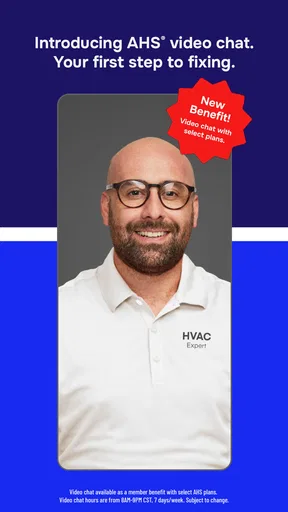
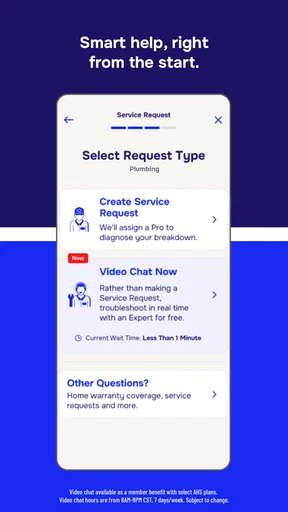

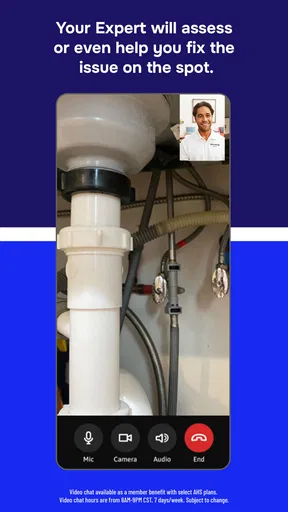
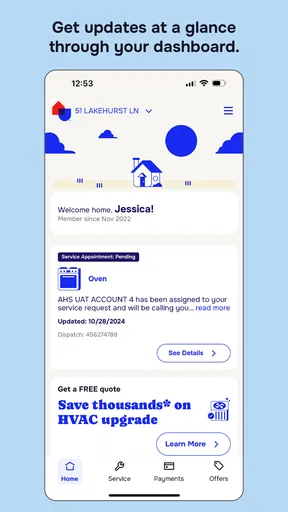
 Analysis by AppCompare
I think about a home warranty app less as a place to browse and more as a tool I want to reach quickly when something goes wrong. A leaking fixture or a heating problem can turn an ordinary day into a string of calls and notes. AHS: American Home Shield is designed to bring claim tasks and account details onto a phone, which can make that first administrative step feel more manageable. The important distinction is that an app can organize a service request, but it does not make the repair itself instant; the value is in keeping the process easier to follow.
When a connection matters
Claim filing and status checks are the moments when a dependable internet connection matters most. I would use the app when I can give the form my attention, enter the issue clearly, and review the information before submitting. That is more useful than trying to rush through a description while standing beside a noisy appliance or moving between rooms. A concise note about what is happening, where it is happening, and when it began gives me a better starting point for keeping the request understandable.
The same connected workflow is useful later, when I want to check whether anything has changed rather than repeatedly contact support just to ask for an update. Notifications can help draw attention to a status change or an approaching technician, but I would still open the claim and read the details rather than treating a notification as the whole story. Phones can be offline, alerts can be missed, and a quick glance is not a substitute for confirming the current information in the account.
Using it around a busy home
The practical setting for this app is often not a quiet desk. I might notice a problem while cooking, doing laundry, or getting ready to leave, then return to it when I have a moment. Keeping service requests and their history together can help me avoid relying on memory, especially if I need to explain whether the same appliance or area has caused trouble before. That history is most useful when I add the new issue thoughtfully instead of assuming the app will infer the connection for me.
For example, if a household member spots water under a sink in the morning, I would first make the immediate situation safe, then use the app when I have a stable connection and enough time to describe what I observed. I would note the location and visible symptoms without guessing at the cause. If another person in the household is handling the request, agreeing on who will submit it can also prevent duplicate effort and conflicting descriptions. These small habits matter because a tidy request is easier to refer back to than a rushed one.
What to do when the process stalls
Even a straightforward app cannot guarantee that every step will go smoothly. If a page takes longer than expected or a submission appears uncertain, I would avoid tapping repeatedly and creating duplicate requests. I would check the connection, reopen the relevant claim area, and confirm whether the request appears in the history before trying again. If the situation remains unclear, using the customer-support route is a sensible next step; the phone interface is a convenience, not a reason to keep guessing.
A claim can also raise questions that a status label alone may not answer. In that case, I would keep the issue description and any relevant account details in mind before contacting support, so I can explain the situation without starting from scratch. The app’s claim history is helpful as a reference, but it should not replace careful attention to the actual instructions attached to a request. I find that distinction important: tracking helps me stay organized, while a person or the specific claim details may be needed when the next action is not obvious.
Worth Reading Before You Choose

EA SPORTS FC Mobile 26 Is a Bigger Football Game, but It Takes Time

Flipboard Shows What News Apps Must Do Beyond the Feed

Switching to Android Auto Means Rethinking Your Driving Routine

Google Calendar Makes a Crowded Week Easier to Manage

Ludo King Makes the Most of the Minutes Between Plans

Baby Panda World Brings Quick Play to Modern Phones, but Its Game Library Feels Busy
Data, attention, and sensible habits
Because the app handles account and service-request tasks, I would use it deliberately rather than entering details while distracted. Before submitting, I would review the issue description and check that I am working in the right account. When using a phone on the move, I would also consider whether I have a private moment to view or edit personal information. Those are ordinary precautions, but they make more sense here than treating a home-repair request as a casual browsing task.
For a data-conscious routine, I would rely on the app when I need to file or follow a request, then avoid reopening it repeatedly just to see whether something has changed. Notifications can reduce that checking, provided they are enabled and useful to me; I can also check the claim directly when I want a fuller view. The best balance is to let the app handle the administrative trail without expecting it to replace a clear conversation or careful record-keeping for a complicated repair.
There is a useful trade-off between managing a claim on a phone and calling someone directly. The app suits a person who values having the request and its history in one place, while a direct conversation may be better when the problem is difficult to describe, urgent, or tied to several questions at once. I would choose the method that makes the issue easiest to communicate, not assume that digital is automatically faster in every situation.
In the sections that follow, I look at the app itself: how it is organized, what it helps with, and where I think it fits in a homeowner’s routine.
If you're like me and juggling home maintenance feels like a never-ending saga, then you might have stumbled upon the AHS: American Home Shield app. Let's dive into what makes this app tick and whether it’s worth a spot on your smartphone.
Initial Impressions
First things first, downloading the AHS: American Home Shield app was a breeze. Available on both Android and iOS, it’s free to download, which is always a win. The interface? Pretty slick. It’s not the flashiest, but it’s straightforward and gets the job done—kind of like that favorite old sweatshirt you can’t let go of.
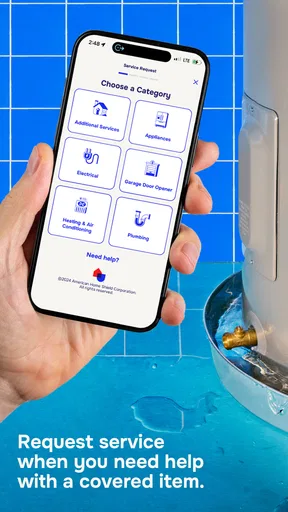
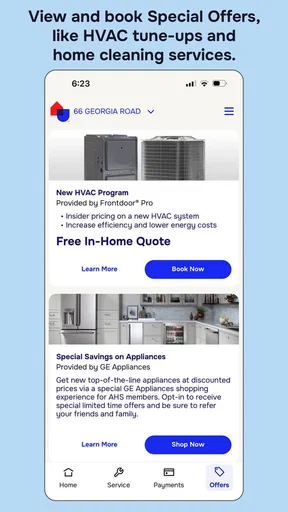
The app's layout is intuitive, with categories clearly laid out. Everything you need is just a few taps away. Whether you need to file a claim, track the status of an existing one, or just browse services, it’s all right there. No more digging through paperwork or waiting on hold with customer service. Hallelujah!
Features That Stand Out
What I love about this app is how it puts all the necessary information right at your fingertips. Here’s a little rundown of what you can expect:
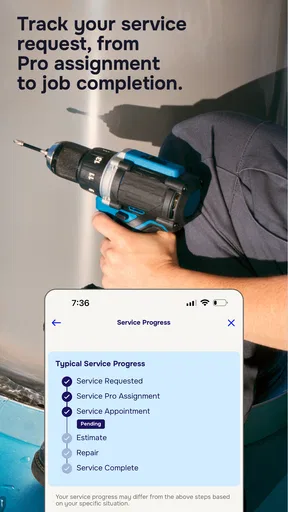
- File and Track Claims: Got a leaky faucet or a furnace on the fritz? Filing a claim is as easy as pie. Just tap through the prompts, and you’re golden. Plus, tracking your claim’s status is super straightforward, so you’ll never be left in the dark.
- Service Request History: Ever had that moment of déjà vu, wondering if you’ve dealt with the same issue before? The app keeps a detailed history of all your service requests. It’s like having a personal assistant keeping track of your home maintenance saga.
- Account Management: Updating your personal info or payment details is a cinch. No fuss, no muss.
User Experience
Let’s be real, the user experience can make or break an app. Fortunately, AHS: American Home Shield seems to have hit the nail on the head here. Navigating through the app is smooth sailing. The load times are quick, and I didn’t experience any crashes, which is always a plus.
The app also sends notifications and reminders, which is perfect for someone like me who tends to forget about these things until they become urgent. Getting a little nudge when a service technician is on their way or when a claim status changes is a game-changer.
Customer Support
Even with the best apps, sometimes you need a little extra help. The customer support feature is easily accessible through the app. You can choose to chat with a representative or send an email directly. I tested the chat feature and was pleasantly surprised by the prompt response time. It’s like having a direct line to a helpful friend.
Who will get the most from it?
This is a business app from frontdoor, but its day-to-day audience is homeowners who already manage their home-warranty tasks through American Home Shield. It makes the most sense if you expect to file a claim, check a request, or keep account information handy. The app is free, rated for Everyone, and has a 4.8 average from around 12 thousand ratings, with over 100 thousand installs. Those figures suggest it has found a substantial audience, but they do not tell me whether a particular warranty or repair is right for you.
I would not install it expecting a general home-maintenance planner, a directory for every local contractor, or a replacement for comparing repair quotes. Its purpose is narrower: managing the AHS relationship on a phone. If you do not have an AHS account or do not intend to use its warranty service, the central claim and account tools are unlikely to be useful enough to justify keeping it. Someone who prefers to choose an independent technician for each repair may be better served by contacting contractors directly and tracking work in their own notes.
A practical claim workflow
One useful way to approach a request is to separate observation from diagnosis. If an appliance stops working, I would record what it does and does not do, when I first noticed the issue, and any changes since then. I would avoid declaring a specific mechanical cause unless I actually know it. Then I could submit the request and use the history as a reference if I need to follow up. This keeps the initial account clear and reduces the chance that a guess becomes confused with a confirmed finding.
That approach is especially helpful when different people in a household notice different parts of the same problem. One person may see water on the floor; another may know the leak began after using a fixture. Before filing, a quick conversation can combine those observations into one coherent description. It is a small, non-obvious advantage of having a shared process: the app can hold the request, but the household still has to coordinate what goes into it.
The service history can also help when a familiar problem returns. Rather than relying on “I think this happened last year,” I would check the older request and use its details as context for the new one. I would not assume a past claim determines how a current request will be handled, but it can help me describe what is recurring and what has changed. That is a better use of history than treating it as a guarantee of a particular outcome.
Where the app sits among alternatives
Compared with the usual alternatives—calling support, using a web account, or keeping notes in a household document—the app’s clearest advantage is having claim tracking, service history, and account tasks together on a mobile device. That is convenient when I want to check a request while away from my computer. A call still has an edge when I need to explain a complicated sequence or ask several questions in one go. A web account can be more comfortable for anyone who prefers a larger screen, while a simple notes file gives more flexibility but requires me to maintain the record myself.
For me, the best choice depends on the task. I would use the app for a routine claim and later status checks, but switch to a conversation if I cannot tell what the status means or need help describing an unusual issue. I would keep my own practical notes for details I want to remember, rather than assume every useful observation belongs in an account form. That mix avoids asking one tool to do everything.
Small frictions worth knowing
The main limitation is that the app’s usefulness depends on the connected service process behind it. A clear interface can make a request easier to submit, but it cannot by itself resolve a coverage question, make an appointment fit a busy schedule, or explain a complicated repair. I would treat the app as a channel for organizing and following the request, not as a promise about how quickly the real-world work will happen.
There is also a practical cost to doing everything on a phone: typing a detailed account of a problem on a small screen can be tedious, and reviewing account information in a hurry invites mistakes. If I have several symptoms to explain, I would draft the key points first and then enter them carefully. If I am dealing with an urgent situation, I would address immediate safety needs before using any app to document it. The phone is useful, but it should not distract from the repair problem itself.
Version 2.27.28 is the current release, and the app requires Android 10 or later. I would check that requirement before installing on an older device. It was released on October 2, 2024, and the free download lowers the barrier to trying the mobile account workflow, though using the app should not be confused with the terms of a home-warranty plan. For anyone deciding whether to rely on it, the key question is whether mobile claim management is part of how they want to handle home repairs.
Final Thoughts
Overall, the AHS: American Home Shield app is a handy tool for anyone dealing with home maintenance. It simplifies the process, saves time, and reduces the stress of managing home repairs. While it might not be packed with bells and whistles, its efficiency and ease of use make it a worthwhile download.
If you’re managing a household and want to streamline your home maintenance tasks, give this app a whirl. It could become your go-to assistant in keeping your home running smoothly. Plus, with the convenience of having everything on your phone, you can manage it all without breaking a sweat. Trust me, your future self will thank you!
Pros
- Comprehensive coverage options available.
- Customizable plans for different needs.
- User-friendly claim submission process.
- Quick response times for service requests.
- 24/7 customer support accessible.
Cons
- Coverage exclusions may apply.
- Monthly premiums can be high.
- Service fees required per claim.
- Contract terms can be restrictive.
- Limited choice of service providers.
FAQs for AHS: American Home Shield
What services does the AHS app offer?
The AHS: American Home Shield app provides users with convenient access to their home warranty services. It allows you to file and track claims, manage your account, view your coverage details, and schedule repairs or maintenance tasks directly from your mobile device. This app is designed to streamline your home protection needs efficiently.
Is the AHS app user-friendly for beginners?
Yes, the AHS app is designed with user-friendliness in mind, featuring an intuitive interface that is easy for beginners to navigate. The app includes guided steps for filing claims and scheduling services, making it accessible even to those who may not be tech-savvy. Tutorials and a help section are also available for additional support.
Can I manage multiple properties with the AHS app?
Absolutely. The AHS app allows you to manage multiple home warranty plans if you own more than one property. You can easily switch between properties to view coverage details, file claims, and schedule services, ensuring efficient management of all your home protection needs from a single platform.
How does the AHS app handle customer support?
The AHS app provides robust customer support features, including a direct line to customer service representatives via chat or phone. Additionally, it offers a comprehensive FAQ section, troubleshooting guides, and the ability to track the status of your service requests in real-time, ensuring you receive timely assistance whenever needed.
Is the AHS app available for both Android and iOS devices?
Yes, the AHS app is available for download on both Android and iOS platforms. It is compatible with a wide range of devices, ensuring that users can access their home warranty services on the go, regardless of their smartphone or tablet preference. Download links are readily available on the official app stores.


